


It’s 2012 and my first resolution of the year is to finally tell the truth about testing : unit testing is pretty much useless when your code runs inside a container. How do you unit test an EJB which relies on the container services (i.e transaction, injection, security…) ? Well, you mock the database access, you mock your security layer, you mock your dependencies, you mock your validation layer… to test what ? A bit of business logic. Yes. Unit test is interesting when you have complex business logic to test so you can have quick feedback. Otherwise, it’s a waste of time which doesn’t test your container services. So I’m not saying unit testing is completely useless, I’m saying that integration testing is also to be considered when you run your code inside a Java EE container.
In this post I’ll show you how to unit test an EJB with Mockito and how to do integration test with and without Arquillian.
Use case
So let’s take a simple use case (but of course, in real life it’s more complex) : I have a Book entity with a complex named query (well, sort of) and an EJB that queries the entity (CRUD operations + calling the named query). Because my JPQL query is complex and I have a bug in production, I want to reproduce the bug and correct the JPQL query. Because I like Java EE 6 and CDI I use extensively some artifacts that need to be injected (such as a Logger, DataSourceDefinition and so on).
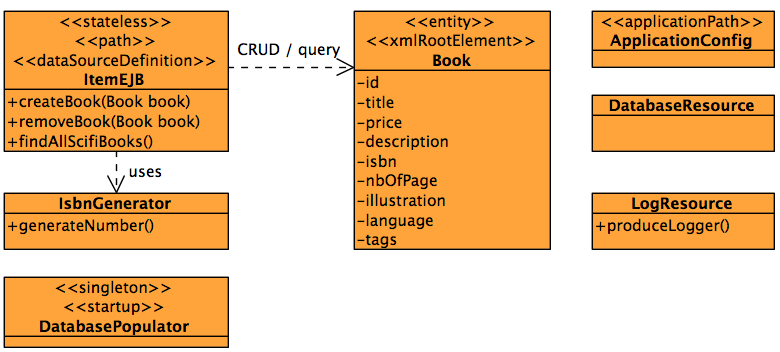
As you can see in the class diagram, I have the following classes :
- ItemEJB : a stateless EJB with a @Path annotation to add REST services. It manipulates the Book entity.
- Book : entity with JPA annotation for persistence and query as well as JAXB annotations for XML marshaling.
- IsbnGenerator : CDI bean that generates an ISBN number for the book.
- DatabasePopulator : startup singleton that persists a few books into the database.
- ApplicationConfig : helper class annotated with @ApplicationPath to declare all REST services under the /rs URL.
- DatabaseResource : produces an injectable EntityManager.
- LogResource : produces an injectable logger.
The Book entity
The Book entity is pretty simple but some things have to be highlighted :
[sourcecode language=”java” highlight=”3,9,11″]
@Entity
@NamedQueries({
@NamedQuery(name = Book.FIND_ALL_SCIFI, query = "SELECT b FROM Book b WHERE ‘scifi’ member of b.tags ORDER BY b.id DESC")
})
public class Book {
public static final String FIND_ALL_SCIFI = "Book.findAllScifiBooks";
@Id @GeneratedValue
private Long id;
@NotNull
private String title;
private Float price;
private String description;
private String isbn;
@ElementCollection
private List tags = new ArrayList();
..
[/sourcecode]
This entity has a named query which retreives all the scifi books from the database and I need to test it (this query is pretty simple but imagine an harder one). The JPA provider will generate an id automatically thanks to @GeneratedValue. The integration between JPA with Bean Validation will make sure I cannot insert a Book with a null title (thanks to @NotNull). These services have to be mocked in unit testing (not in integration test as you will see).
The ItemEJB
The ItemEJB is a Stateless EJB with REST capabilites doing CRUD operations and invoking the entity named query :
[sourcecode language=”java” highlight=”1,5,11″]
@Stateless
public class ItemEJB {
@Inject
private EntityManager em;
@Inject
private IsbnGenerator numberGenerator;
@Inject
private Logger logger;
public Book createBook(Book book) {
book.setIsbn(numberGenerator.generateNumber());
em.persist(book);
return book;
}
public void removeBook(Book book) {
em.remove(em.merge(book));
}
public List findAllScifiBooks() {
logger.info("###### findAllScifiBooks ");
return em.createNamedQuery(Book.FIND_ALL_SCIFI, Book.class).getResultList();
}
…
}
[/sourcecode]
This POJO uses several services from the container. First of all, every method is transactional (without any extra boiler plate code, just because it’s annotated with @Stateless). Then, this EJB gets injected an EntityManager that has been produced (see below), a helper class (the IsbnGenerator POJO) and a logger (I’ll use the good old java.util.logging so my code doesn’t have external dependencies). Again, these services will have to be mocked in unit testing.
DataSource
I need a datasource to access a database. Because I want to do some testing, Derby in-memory database will do. And because I’m pretty lazy and don’t want to create a datasource inside my container using the admin console, I use the @DataSourceDefinition annotation to make my life easier :
[sourcecode language=”java” highlight=”1,7″]
@DataSourceDefinition(name = "java:app/jdbc/sampleArquilianWytiwyrDS",
className = "org.apache.derby.jdbc.EmbeddedDriver",
url = "jdbc:derby:memory:sampleArquilianWytiwyrDB;create=true;user=app;password=app"
)
public class DatabaseResource {
@Produces
@PersistenceContext(unitName = "sampleArquilianWytiwyrPU")
private EntityManager em;
}
[/sourcecode]
As you can see I produce my EntityManager so it can be injected with @Inject. In unit testing this class is pretty much useless as no datasource can be used and injection as to be mocked.
Testing scenario
As I said, I want to test a complex scenario with all the container services available (so this is not unit testing per se). Here is the scenario :
- I get all the scifi books from the database (using the named query that looks for the scifi tag)
- I persist three books : one that fills the query, another one that doesn’t and a third one that has a null title which will not get persisted (due to Bean Validation ConstraintViolationException)
- I get all the scifi books from the database again and make sure there is an extra one
- I remove all the entities from the database
- I get all the scifi books from the database again and make sure we have the initial number of books
Implementing the scenario with unit testing
[sourcecode language=”java” highlight=”4,12,19″]
@RunWith(MockitoJUnitRunner.class)
public class ItemEJBTest {
@Mock
private EntityManager mockedEntityManager;
@Mock
private TypedQuery mockedQuery;
private ItemEJB itemEJB;
@Before
public void initDependencies() throws Exception {
itemEJB = new ItemEJB();
itemEJB.setEntityManager(mockedEntityManager);
itemEJB.setNumberGenerator(new IsbnGenerator());
itemEJB.setLogger(Logger.getLogger(ItemEJB.class.getName()));
}
@Test
public void shouldFindAllScifiBooks() throws Exception {
List books = new ArrayList();
// Finds all the scifi books
when(mockedEntityManager.createNamedQuery(Book.FIND_ALL_SCIFI, Book.class)).thenReturn(mockedQuery);
when(mockedQuery.getResultList()).thenReturn(books);
int initialNumberOfScifiBooks = itemEJB.findAllScifiBooks().size();
// Creates the books
Book scifiBook = new Book("Scifi book", 12.5f, "Should fill the query", 345, false, "English", "scifi");
Book itBook = new Book("Non scifi book", 42.5f, "Should not fill the query", 457, false, "English", "it");
Book nullBook = new Book(null, 12.5f, "Null title should fail", 457, true, "English", "scifi");
// Persists the books
itemEJB.createBook(scifiBook);
itemEJB.createBook(itBook);
verify(mockedEntityManager, times(2)).persist(any());
try {
doThrow(ConstraintViolationException.class).when(mockedEntityManager).persist(nullBook);
itemEJB.createBook(nullBook);
fail("should not persist a book with a null title");
} catch (ConstraintViolationException e) {
}
// Finds all the scifi books again and make sure there is an extra one
books.add(scifiBook);
when(mockedQuery.getResultList()).thenReturn(books);
assertEquals("Should have one extra scifi book", initialNumberOfScifiBooks + 1, itemEJB.findAllScifiBoks().size());
// Deletes the books
itemEJB.removeBook(scifiBook);
itemEJB.removeBook(itBook);
verify(mockedEntityManager, times(2)).remove(any());
// Finds all the scifi books again and make sure we have the same initial numbers
books = new ArrayList();
when(mockedQuery.getResultList()).thenReturn(books);
assertEquals("Should have initial number of scifi books", initialNumberOfScifiBooks, itemEJB.findAllScifiBooks().size());
}
}
[/sourcecode]
Some explanation :
- line number 4 and 6 : thanks to @RunWith(MockitoJUnitRunner.class), I’m mocking the database access by mocking my EntityManager and TypedQuery with the @Mock annotation
- line number 12 : in the initDependencies method that’s where we lose all the container services : we do a new of the ItemEJB (itemEJB = new ItemEJB()) instead of injecting or lookingup the EJB. Instanciating ItemEJB is not seen by the container, so it’s just a POJO without any container services. And because we run in isolation, we have to manually mock or instanciate the dependencies using setters (setEntityManager, setNumberGenerator and setLogger).
- line number 19 : shouldFindAllScifiBooks implements our testing scenario. As you can see, I use an ArrayList to add my books and Mockito returns this list (instead of the query result). I then persist my books (verify(mockedEntityManager, times(2)).persist(any())) and I want to make sure I get a ConstraintViolationException when persisting a book with a null title (that why I have doThrow(ConstraintViolationException.class).when(mockedEntityManager).persist(nullBook)). To test that my query returns an extra book I just add the object to the list (books.add(scifiBook)) and remove it afterwards (books.remove(scifiBook)).
As you can see, I haven’t tested my JPQL query, the code is not that nice, and I have to do many Mockito tricks to simulate what I want. Isn’t that a test smell ? A Mockery ? We shouldn’t mock third-party libraries. So let’s do integration tests.
Implementing the scenario with integration testing
I can hear you saying “Integration test in Java EE is difficult, don’t do that“. This was true in the past but not anymore. Integration testing use to be nearly impossible, that’s why we had no choice but unit test and mock all the services. But today, thanks to Java EE 6, we can easily do integration testing. How ? By using standard (and some time non standard) APIs or testing frameworks such as Arquillian :
- EJBContainer.createEJBContainer() : creates an in-memory EJB container where you can deploy and use your EJB
- Persistence.createEntityManagerFactory() : creates a JPA provider so you can manipulate entities
- Validation.buildDefaultValidatorFactory() : gets a validator to validate your beans
- ActiveMQConnectionFactory : creates an in-memory JMS broker (non-standard)
- ServletTester : Jetty helper class to test your servlets and web services in-memory (non-standard, I whish we had a standard WebContainer API like in EJBs)
Without Arquillian (i.e EJBContainer)
Let’s start with the simplest standard integration test for an EJB : using the javax.ejb.embeddable.EJBContainer API. This API was created in EJB 3.1 and is used to execute an EJB application in an embeddable container (in a standard way). Here is the code of our scenarion with the EJBContainer (BTW I’m using GlassFish 3.1 as the implementation) :
[sourcecode language=”java” highlight=”3,7,15,22,26,43″]
public class ItemEJBWithoutArquillianIT {
private static EJBContainer ec;
private static Context ctx;
@BeforeClass
public static void initContainer() throws Exception {
Map properties = new HashMap();
properties.put(EJBContainer.MODULES, new File[]{new File("target/classes"), new File("target/test-classes")});
ec = EJBContainer.createEJBContainer(properties);
ctx = ec.getContext();
}
@AfterClass
public static void closeContainer() throws Exception {
if (ec != null) {
ec.close();
}
}
@Test
public void shouldFindAllScifiBooks() throws Exception {
// Check JNDI dependencies
assertNotNull(ctx.lookup("java:global/classes/ItemEJB"));
assertNotNull(ctx.lookup("java:global/jdbc/sampleArquilianWytiwyrDS"));
// Looks up for the EJB
ItemEJB itemEJB = (ItemEJB) ctx.lookup("java:global/classes/ItemEJB");
// Finds all the scifi books
int initialNumberOfScifiBooks = itemEJB.findAllScifiBooks().size();
// Creates the books
Book scifiBook = new Book("Scifi book", 12.5f, "Should fill the query", 345, false, "English", "scifi");
Book itBook = new Book("Non scifi book", 42.5f, "Should not fill the query", 457, false, "English", "it");
Book nullBook = new Book(null, 12.5f, "Null title should fail", 457, true, "English", "scifi");
// Persists the books
itemEJB.createBook(scifiBook);
itemEJB.createBook(itBook);
try {
itemEJB.createBook(nullBook);
fail("should not persist a book with a null title");
} catch (Exception e) {
assertTrue(e.getCause() instanceof ConstraintViolationException);
}
// Finds all the scifi books again and make sure there is an extra one
assertEquals("Should have one extra scifi book", initialNumberOfScifiBooks + 1, itemEJB.findAllScifiBooks().size());
// Deletes the books
itemEJB.removeBook(scifiBook);
itemEJB.removeBook(itBook);
// Finds all the scifi books again and make sure we have the same initial numbers
assertEquals("Should have initial number of scifi books", initialNumberOfScifiBooks, itemEJB.findAllScifiBooks().size());
}
}
[/sourcecode]
Some explanation :
- line number 7 : here I create my embedded EJB container and get the JNDI context. As you can see, I don’t have to mock anything (EntityManager, injection and so on) because from now on my code will be running in an embedded container (which is the same container that you will be running in production, but in runtime mode instead of in-memory)
- line number 15 : closes the EJB container once the test is passed
- line number 22 : in this method I implement our testing scenario, with no mocks. I lookup my EJB using JNDI and invoke the needed methods (findAllScifiBooks, createBook and removeBook) which will be intercepted by the container that will give me all the services (transactions, injection, lifecycle…)
- line number 26 : because I’m running inside a container, I can even lookup my datasource (because it has been deployed thanks to @DataSourceDefinition
- line number 43 : if I persist a book with a null title, Bean Validation will throw a constraint violation (a real one, I don’t have to mock it)
With Arquillian
Arquillian is a JBoss project that can execute test cases inside a container (embedded, local or remote). And when I say a container, it can run the same test in several ones (GlassFish, JBoss…). In my case I’m using GlassFish, so as you can see, Arquillian is not stuck to JBoss. I will write about multiple server deployment later, but for now, let’s see how an integration test with Arquillian differs from one with the EJBContainer API :
[sourcecode language=”java” highlight=”1,4,8,17″]
@RunWith(Arquillian.class)
public class ItemEJBWithArquillianIT {
@Inject
private ItemEJB itemEJB;
@Deployment
public static JavaArchive createTestArchive() {
JavaArchive archive = ShrinkWrap.create(JavaArchive.class)
.addPackage(Book.class.getPackage())
.addAsManifestResource(EmptyAsset.INSTANCE, "beans.xml")
.addAsResource("META-INF/persistence.xml", "META-INF/persistence.xml");
return archive;
}
@Test
public void shouldFindAllScifiBooks() throws Exception {
// Check JNDI dependencies
Context ctx = new InitialContext();
assertNotNull(ctx.lookup("java:global/jdbc/sampleArquilianWytiwyrDS"));
// Finds all the scifi books
int initialNumberOfScifiBooks = itemEJB.findAllScifiBooks().size();
// Creates the books
Book scifiBook = new Book("Scifi book", 12.5f, "Should fill the query", 345, false, "English", "scifi");
Book itBook = new Book("Non scifi book", 42.5f, "Should not fill the query", 457, false, "English", "it");
Book nullBook = new Book(null, 12.5f, "Null title should fail", 457, true, "English", "scifi");
// Persists the books
itemEJB.createBook(scifiBook);
itemEJB.createBook(itBook);
try {
itemEJB.createBook(nullBook);
fail("should not persist a book with a null title");
} catch (Exception e) {
assertTrue(e.getCause() instanceof ConstraintViolationException);
}
// Finds all the scifi books again and make sure there is an extra one
assertEquals("Should have one extra scifi book", initialNumberOfScifiBooks + 1, itemEJB.findAllScifiBooks().size());
// Deletes the books
itemEJB.removeBook(scifiBook);
itemEJB.removeBook(itBook);
// Finds all the scifi books again and make sure we have the same initial numbers
assertEquals("Should have initial number of scifi books", initialNumberOfScifiBooks, itemEJB.findAllScifiBooks().size());
}
}
[/sourcecode]
Some explanation :
- line number 4 : thanks to Arquillian, I can inject a reference of my EJB instead of looking it up. My test runs inside the container, so I can use the injection service of this container
- line number 8 : the createTestArchive method uses ShrinkWrap to create an archive which will then be deployed by Arquillian in the container
- line number 17 : the code of the integration test is nearly the same as the one we say before
Some metrics
Ok, some metrics now. How much does it cost to run a unit test vs integration tests ? I measured each of these tests (on my fantastic Mac Book Pro – i7 – 8Gb RAM – SSD drive) and here is the execution time :
- unit testing : 195 milliseconds to run
- integration test without Arquillian : 5.3 seconds (that’s 27 times slower than unit testing)
- integration test with Arquillian : 6.1 seconds (that’s 31 times slower than unit testing)
Conclusion
There is unit testing and integration testing. Historically integration testing was pretty much impossible in Java EE and you had to do many different tricks. That’s why we used extensively unit testing and mocked even objects that we don’t owe (like the EntityManager). But since Java EE 6, thanks to all our container factories (EJBContainer, EntityManagerFactory, ValidatorFactory…) we can now easily use these container and their services in an embedded mode. Unit testing is good to test business code or code in isolation (mocking external components) but we have to remember that we have easy integration testing now and we should use it to test code interacting with external components or services.
But the world is not perfect… yet. The big advantage of unit testing is the quick feedback because unit tests run faster. But, because you are mocking so many services, you don’t have a clue how your code will behave in production. Integration test uses the container and the container services, so you know that What You Test Is What You Run.
I little bit of hope now. A few month ago I wrote a (long) post about startup time of most of the Java EE 6 application servers. Most of the application servers startup in less than 4 seconds. If you look at the application servers history, that is a huge improvment in the last years. Same thing will happen with embedded containers and integration test framework such as Arquillian : they will get faster and faster, and soon, running your in-memory database and in-memory container will cost you little resources. Having fast integration tests that’s what we want !
Thanks
I would like to thank Brice Duteil, a Mockito committer who gave me some advices on Mockito.